Docs
Quickstart
Go from a fresh clone to a team of bots answering in your browser. On most machines it takes a few minutes, plus a one-time model download in the background.
What you need
- Rust (stable), installed with rustup.
- Node.js 20 or newer with npm, to build the web app. The finished binary doesn't need it.
- At least one AI account for your bots. Any one of these is enough:
- the
claudeCLI, installed. You don't need to sign it in first, because kwant has a Sign in with Claude button; - the
codexorgrokCLI, signed in on the same machine (codex login,grok login); - an Anthropic, OpenAI or xAI API key, which you add in the app under Space settings → Accounts.
- the
- Optional: Docker for VM mode and the bots' shared browser, and
uvorpython3for the Laya router.
1. Run from a fresh clone
git clone https://github.com/alexsergivan/kwant.git
cd kwant
make run   # builds the web app, then runs `cargo run -- serve`
Open http://127.0.0.1:8799. On your own computer there's nothing to sign in to. If no account works yet, kwant shows a Get ready banner with an Add an account button.
cargo run -- serve --no-laya.cargo run -- serve on its own works only once frontend/dist exists, because the binary embeds the web app. After the first make run (or make frontend) you can use either.
2. Add an account
Pick whichever you have:
- Claude: click Sign in with Claude, open the link and paste the code shown back into kwant.
- Codex or Grok: sign the CLI in on this machine, and kwant uses it as is.
- API key: open Space settings → Accounts and add an Anthropic, OpenAI or xAI key. Keys are write-only: the app never shows them again.
You can add several accounts per engine, such as a work and a personal one. See Accounts & profiles.
3. Ask your first question
A fresh install's Default space starts with three bots in #general, on the @core-engineering team:
| Bot | Title | Good at |
|---|---|---|
| Architect | Systems Architect | Architecture, software design, multi-file engineering |
| TechLead | Staff Engineer & Prototyper | Fast reasoning, prototyping, clear explanations |
| DevOps | Systems & Security Engineer | Shell, servers, containers, security |
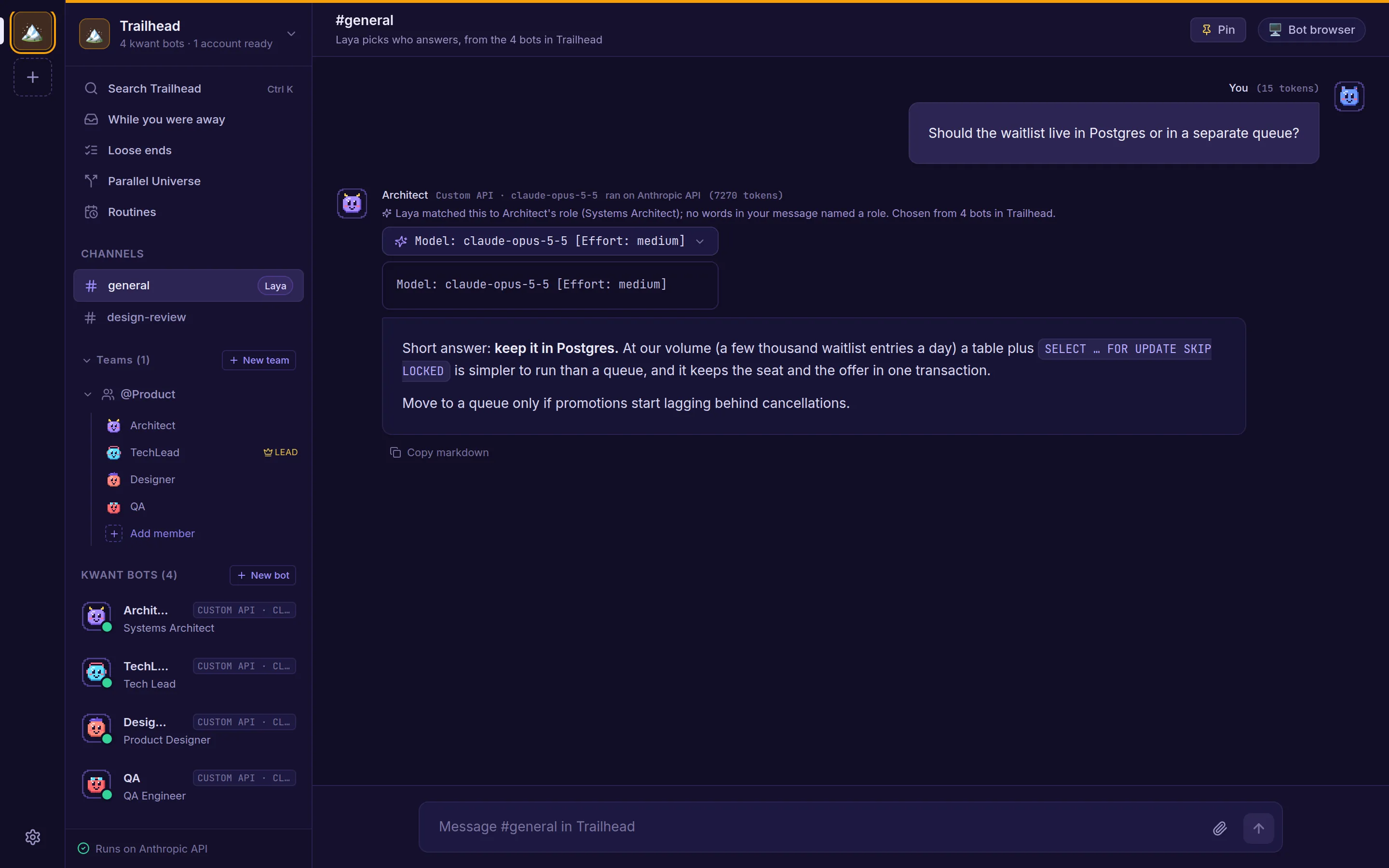
Type a question in #general. kwant picks the bot that fits best and shows why. Mention a bot by name (@Architect) to ask it directly, or ask in the team's chat (@core-engineering): when a question needs several views, the lead runs a short discussion and posts one summary.
Next steps
- Create bots and teams from ready-made personas.
- Choose how often bots ask before running commands.
- Run kwant on a server with systemd or Docker Compose.
- Give bots tools like GitHub or Notion through MCP.
Running the tests
cargo test               # Rust tests (run `make frontend` first: they need frontend/dist)
cd frontend && npm test  # web app tests