Docs
Approvals & saved passwords
You decide how much a bot may do without asking. Risky actions wait on a card with the exact command or arguments, and kwant's own secrets are off limits in every mode.
Approval cards
When a bot wants to run a command, edit a file outside its folder or call a tool, you see a card with what it will do:
- Allow once runs this one call.
- Always allow allows that tool for that bot until kwant restarts.
- Deny refuses it, and the bot is told.
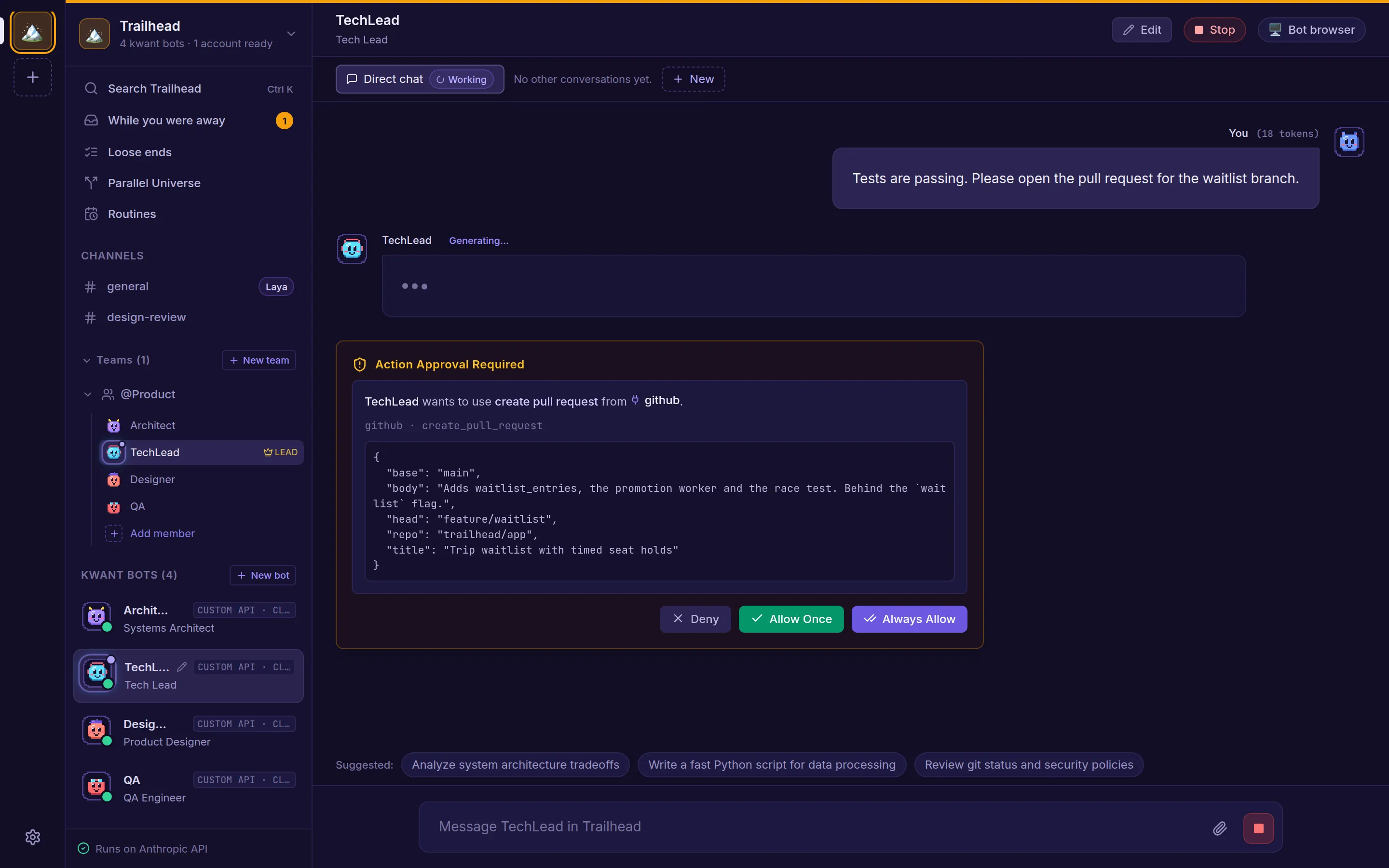
Only you can answer a card. Bots' own tools can't, and neither can a bot calling kwant's API.
Approval modes
Each space has a mode, and each bot can override it or follow the space. Only you can change it.
| Mode | In the app | What happens |
|---|---|---|
ask (default) | Ask before running commands | Every tool call outside the bot's folder shows a card. |
smart | Ask only when risky | Ordinary work runs without a card. Anything risky or unclear shows the card, with the reason. |
off | Don't ask | Everything runs. |
In every mode, a call that names kwant's own secret files (the vault, its key, the API token) is refused and recorded as denied. Calls that run without a card are recorded too, and under smart each record says why it was judged safe.
What "Ask only when risky" lets through
- Shell commands in the bot's folder that a fail-closed allowlist recognises as safe: file and text tools like
ls,catorjq, and build tools likecargo,npm,makeorgit, with checks. Network tools,sudo, containers,git push, package installs,npx, inline code, and any path outside the folder still ask. - Reads outside the folder, unless they touch system data or anything that looks like a credential:
.ssh,.aws,.envfiles, key files, browser profiles, shell histories and more. - MCP tools the server marks read-only and not destructive.
Requests to kwant itself, on its own port or any loopback /api/ path, always ask. Writes and edits outside the folder, and unknown tools, always ask.
smart guards against accidents. It isn't a sandbox. Scripts in the bot's folder, make, cargo build and npm run run without a card and can do anything the bot's user can, including a script the bot wrote a moment earlier. Use ask for bots or folders you don't trust."Always this session"
Under ask and smart, "Always this session" on a Claude tool's card allows that tool, for example all Bash, for that bot and conversation until kwant restarts.
Saved passwords
kwant can fill website logins in a team's, channel's or bot's browser. Passwords live in one of two stores:
| Store | Where |
|---|---|
| Built-in (default) | Encrypted files in <data dir>/kwnt-vault/, with the key next to them. |
| Bitwarden | Your own Bitwarden or Vaultwarden account, folder kwnt, after you unlock it once. |
The built-in store protects against copies of the data folder. It doesn't protect against a bot running as the same user with approvals off, because that bot could read the key. So kwant enforces one rule:
POST /api/passwords/migrate): each one is deleted locally only after Bitwarden has it.How the Bitwarden store works
- kwant talks to Bitwarden itself, not through the
bwCLI orbw serve. - The master password, session and vault key exist only in kwant's memory. Nothing secret is written to disk, passed to a child process or logged.
- After a restart the vault is locked: nothing is filled until you unlock it again.
- Only items in the
kwntfolder that carry kwant's owner field are used. Organisation items, trash and other folders are never read. - Showing a password needs your master password. Five wrong tries in a row lock the vault.